Table of Contents
A well-organized studio is not just about aesthetics. Proper cable management prevents audio interference, reduces troubleshooting time, protects your gear investment, and creates a space where you can focus on making music instead of fighting with tangled cables. An organized studio also impresses clients and collaborators. This guide covers practical cable management techniques, studio layout optimization, gear storage solutions, and maintenance practices that keep your home studio running smoothly.
Key Takeaways
- Separate audio cables from power cables to prevent electromagnetic interference
- Label both ends of every cable for fast troubleshooting
- Use vertical space for storage shelves and cable management
- Ergonomic desk setup prevents fatigue during long sessions
- Regular maintenance extends gear life and prevents session-ruining failures
Cable Management Fundamentals
Proper cable management serves two purposes: preventing technical issues and making your studio easier to maintain. Audio signals are susceptible to interference from power cables, and tangled cables make troubleshooting a nightmare.
Separate audio and power. Audio cables running parallel to power cables pick up electromagnetic interference that manifests as hum, buzz, or radio frequency noise. Keep audio cables and power cables at right angles to each other when they must cross. Maintain at least 6 inches of separation between audio and power cables for parallel runs. Use balanced XLR or TRS cables for all audio connections, as they reject interference better than unbalanced cables.
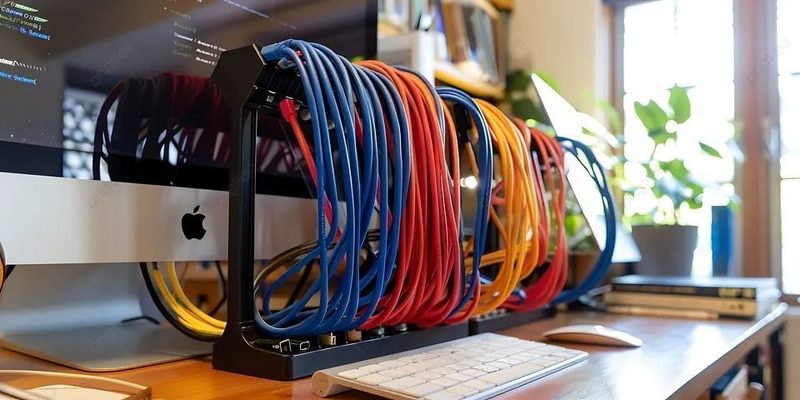
Cable ties and wraps. Use Velcro cable ties rather than plastic zip ties for bundle management. Velcro can be easily removed and repositioned. Zip ties must be cut, risking cable damage. Group cables by type: all power cables in one bundle, all audio cables in another, all USB cables in a third. This organization makes tracing specific cables fast and easy.
Cable length discipline. Buy cables that are the correct length for each connection. Excess cable coiled on the floor creates a mess and can act as an antenna for interference if coiled tightly. If you have excess length, use a figure-eight coil rather than tight loops to avoid inducing noise. Measure your cable runs before buying to avoid excess.
Cable Routing and Concealment
Routing cables neatly hides them from view, protects them from damage, and makes the studio look professional. Several affordable products make cable routing simple.
Cable raceways. Adhesive-backed cable raceways run along baseboards or desk edges and conceal cables inside a plastic channel. They are paintable to match your wall color and are the most effective solution for permanent cable concealment. Install raceways along the baseboard from your desk to your wall outlets. Budget: $15 to $30 for a 6-foot section.
Under-desk cable trays. A wire mesh tray mounted under your desk holds power strips, interfaces, and excess cable length. It keeps everything off the floor and out of sight. Most trays simply screw into the desk underside and provide a large open space for cable management. Budget: $20 to $40.
Wall grommets. If your desk is against a wall, a wall grommet allows cables to pass through the desk surface cleanly rather than draping over the edge. Install a grommet at the back corner of your desk for monitor cables and another near your interface for audio and USB cables. Budget: $10 to $20.
Labeling Systems
Labeling every cable and connection point transforms a frustrating troubleshooting process into a five-second fix. When a cable fails mid-session, you want to identify and replace it instantly.
Label both ends. Use a label maker or color-coded tape flags to label both ends of every cable. The label should identify the source and destination: "Interface Output 1 to Left Monitor," "Mic 1 to Patch Bay Input 3," etc. When you need to trace a signal path, the labels tell you exactly what is connected where without following cables with your finger.
Color coding. Assign colors to cable types: red for microphone cables, blue for instrument cables, green for monitor cables, yellow for USB cables, white for power cables. Color-coded cables are identifiable at a glance, making setup and teardown faster. Colored electrical tape or heat shrink tubing on cable ends implements color coding without buying special cables.
Digital documentation. Keep a diagram of your studio signal flow saved on your phone or printed and posted in the studio. Include which inputs and outputs are used for each piece of gear. When you reconnect everything after a session, the diagram eliminates guesswork. Update the diagram whenever you change your setup.
Desk Layout and Ergonomics
Your desk is the center of your studio. A well-designed layout keeps essential gear within reach, reduces physical strain during long sessions, and maintains clear sight lines to your monitors.
Monitor positioning. Monitors should be at ear height at the edges of your desk, forming an equilateral triangle with your listening position. The screen should be positioned so the top of the display is at or slightly below eye level. Place frequently used gear on the desk surface within easy reach. Less frequently used gear goes on shelves or racks.
Keyboard and mouse position. Your MIDI keyboard should be at a height where your forearms are parallel to the floor. If your desk is too high for comfortable keyboard playing, use a separate keyboard stand that adjusts to the correct height. Your mouse and computer keyboard should allow your elbows to rest at 90-degree angles with wrists straight.
Monitor stands. Desktop monitor stands improve monitor positioning and free up desk space. They also decouple monitors from the desk surface, reducing low-frequency vibrations. Adjustable stands allow precise height and angle tuning. If you have the space, floor-standing monitor stands behind the desk provide the best isolation and positioning flexibility.
Gear Storage Solutions
Proper gear storage protects your equipment from dust, damage, and disorganization. A place for everything and everything in its place saves time and money.
Rack mounting. A rack case or rack furniture houses audio interfaces, headphone amplifiers, patch bays, and outboard gear in a standardized format. Even if you only have a few rack-mount units, installing them in a rack keeps them organized and protected. Desktop rack units hold 4 to 8 spaces of gear. Full-height studio racks hold 12 to 20 spaces.
Microphone storage. Microphones are fragile and sensitive to humidity. Store them in their original cases or padded microphone bags. A dedicated microphone drawer or cabinet with foam cutouts keeps microphones organized and protected. Silica gel packets in the storage area absorb moisture and prevent corrosion of microphone connectors.
Cable storage. Store cables by type and length. Use labeled bins, hanging organizers, or pegboard hooks. Coil cables using the over-under technique to prevent kinks and internal wire damage. The over-under technique involves alternating the direction of each loop, which prevents the cable from twisting and developing memory coils.
Maintenance and Cleaning
Regular maintenance prevents equipment failures that can ruin recording sessions. Simple cleaning and inspection routines extend the life of your gear significantly.
Contact cleaning. Over time, oxidation and dust accumulate on audio connectors, causing crackling sounds and intermittent connections. Use contact cleaner (DeoxIT or similar) on all connectors every six months. Apply a small amount to a connector, insert and remove it several times, and wipe away excess. This simple maintenance prevents most audio connection problems.
Dust management. Dust buildup on gear causes overheating and can damage potentiometers and faders. Cover gear with dust covers when not in use. Clean surfaces with a microfiber cloth. Use compressed air to blow dust from keyboards, interfaces, and rack gear. Keep your studio floor clean to minimize airborne dust.
Cable inspection. Inspect cables regularly for damage. Bend each cable along its length and look for kinks, cuts, or exposed wire. Test cables that show any sign of wear and replace them immediately. A failing cable can damage equipment and will eventually fail mid-session. Keep spare cables of each type for quick replacement.
Studio Organization Checklist
| Frequency | Task | Details |
|---|---|---|
| Weekly | Dust surfaces and gear | Microfiber cloth, compressed air for keyboards |
| Monthly | Inspect cables for damage | Check all XLR, TS, USB, and power cables |
| Monthly | Check cable labels | Replace missing or faded labels |
| Quarterly | Clean audio connectors | Apply contact cleaner to all connectors |
| Quarterly | Reorganize cable bundles | Adjust cable ties and routing as needed |
| Semi-annually | Deep clean studio | Pull gear from racks, clean behind and under |
| Annually | Update signal flow diagram | Document current setup for reference |
Frequently Asked Questions
Do expensive cables sound better?
No. Cables either pass the signal cleanly or they do not. A $20 XLR cable performs identically to a $100 XLR cable of the same length and gauge under normal conditions. The difference is in build quality and durability, not sound quality. Buy cables with good connectors (Neutrik, Switchcraft) and adequate shielding, but do not overspend on boutique cable brands for your home studio.