Table of Contents
Recording professional-quality vocals at home is achievable with the right techniques, even with modest equipment. The difference between amateur and professional vocal recordings often comes down to setup and technique rather than gear cost. Room acoustics, microphone placement, gain staging, and performance capture all play critical roles. This guide covers everything you need to record vocals that sit perfectly in a mix, from preparing your space to capturing the final take.
Key Takeaways
- Treat your recording space with absorption to reduce room reflections, not soundproofing
- Keep the signal chain simple: microphone, cable, interface good preamps matter
- Mic placement 6-12 inches from the singer, slightly off-axis reduces plosives
- Gain stage so peaks hit -6 dB to -3 dB in your DAW leaving headroom for processing
- The performance matters more than the gear. A great take on a budget mic beats a mediocre take on a $5000 mic
Preparing Your Recording Space
The room you record in dramatically affects the sound of your vocals. Reflections from walls, floors, and ceilings create comb filtering and an unnatural ambience that is difficult to remove in mixing.
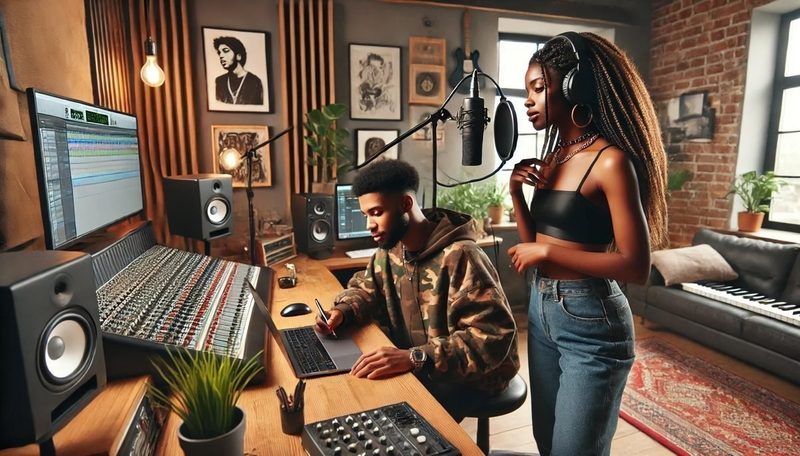
Create a dead zone. Set up your microphone in the most acoustically dead part of the room. Place absorption panels or heavy moving blankets around the singer to reduce reflections. A simple setup is a blanket draped over a mic stand behind the singer and another blanket on a stand to the side. This creates a temporary vocal booth that captures a dry, focused vocal sound.
Closet recording trick. Many great home recordings have been captured in closets. A closet full of clothes is naturally absorptive and creates a dead acoustic environment. Clear a space for the singer and microphone, close the door, and record. The clothes act as natural broadband absorption. This is a proven low-budget technique used by professional producers.
Reflection filter. A portable reflection filter mounted behind the microphone reduces rear reflections but does nothing for reflections from the sides, ceiling, or floor. It is better than nothing but not a replacement for room treatment. Use one in combination with blankets and absorption rather than relying on it alone.
The Vocal Signal Chain
The signal chain for recording vocals is simple: microphone, cable, audio interface, DAW. Each component affects the final sound. Keep the chain as short and clean as possible.
Microphone. A large-diaphragm condenser microphone is the standard choice for studio vocals. It captures detail and transient response that dynamic mics miss. If your room is untreated, a dynamic microphone like the Shure SM7B or Electro-Voice RE20 is actually better because it rejects room sound more effectively. Choose your mic based on your room quality, not just your budget.
Pop filter. A pop filter is essential for recording vocals. It reduces plosive sounds (p, b, t) that cause low-frequency thumps in the recording. A double-layer mesh pop filter is more effective than a single-layer metal screen. Position the pop filter 2 to 4 inches from the microphone, with the singer 2 to 4 inches from the pop filter, giving a total distance of 4 to 8 inches from the mic.
Cable quality. Use a balanced XLR cable of reasonable quality. Cables do not need to be expensive, but they need to be in good condition. A damaged cable introduces hum, crackling, or intermittent signal loss. Test your cable before each session by wiggling it while speaking into the microphone.
Microphone Placement Techniques
Microphone placement is the fastest way to improve vocal recordings without spending money. Small adjustments in position dramatically change the sound.
Distance. Six to twelve inches from the microphone is the standard distance for most vocal styles. Closer distances (4 to 6 inches) create a more intimate, present sound with increased bass proximity effect. Farther distances (12 to 18 inches) capture more room sound and sound more natural but less focused. Closer is generally better for pop and rock. Farther works for softer, more natural styles.
Proximity effect. As the singer moves closer to the microphone, low frequencies increase. This is the proximity effect. Use it intentionally: closer for more warmth and power, farther for a thinner, more controlled sound. Be aware that the proximity effect can cause excessive bass buildup if the singer moves closer during loud sections.
Off-axis placement. Positioning the microphone slightly off-axis (pointed slightly away from the singer's mouth) reduces sibilance and plosives while maintaining a natural sound. Angle the microphone 15 to 30 degrees to the side of the singer's mouth rather than pointing directly at it. This simple adjustment often eliminates the need for de-essing in post-production.
The best vocal microphone position is not directly in front of the mouth. A slight offset reduces sibilance, plosives, and breath noise while maintaining full frequency response.
Gain Staging for Clean Recordings
Gain staging is setting the recording level correctly to capture the cleanest possible signal. Recording too hot causes distortion. Recording too low introduces noise when you boost the level later.
Setting the level. Ask the singer to perform the loudest section of the song. Adjust the gain on your audio interface so the loudest peaks hit -6 dB to -3 dB on your DAW meter. This leaves sufficient headroom to prevent clipping while keeping the signal well above the noise floor. Most interfaces have a peak indicator light that turns red when clipping. Keep it off.
48V phantom power. Condenser microphones require 48V phantom power from the audio interface. Ensure phantom power is enabled before recording. Dynamic microphones do not need phantom power but are not damaged by it. Enable phantom power before connecting or disconnecting microphones to avoid loud pops that can damage speakers and headphones.
Monitoring. Zero-latency monitoring routes the microphone signal directly to headphones without passing through the DAW. This eliminates the delay that makes it impossible for singers to hear themselves in time. Most audio interfaces have a direct monitoring button or knob. Set the balance between the input signal and the DAW playback so the singer hears both clearly.
Capturing the Performance
Technical setup is meaningless without a great performance. The singer is the most important element in the recording chain. Creating an environment where the singer can deliver their best performance is your primary job as the engineer.
Singer comfort. The singer should be standing, not sitting. Standing allows better breath support and projection. The room temperature should be comfortable but cool. Have water at room temperature available. Avoid dairy products before recording as they create mucus that affects vocal clarity. Headphone mix is critical the singer needs to hear themselves clearly over the track.
Multiple takes. Record the entire song at least three times. Do not stop for mistakes. A complete take has emotional continuity that punch-ins lack. After three full takes, comp the best sections from each take to create the perfect performance. Most professional recordings are comped from multiple takes, not a single perfect performance.
Headphone bleed. Headphone bleed (the click track or instruments leaking into the microphone) is a common problem. Use closed-back headphones for tracking. Keep the headphone volume as low as the singer can tolerate. The headphone mix should have the vocal prominently centered so the singer does not need to push the volume to hear themselves.
Basic Vocal Editing and Comping
After recording, comping and basic editing transform multiple takes into a polished vocal track. The goal is a natural-sounding performance without technical flaws.
Comping. Listen through all takes and identify the best performance of each section. Use takes or section markers to label which take is best for verse 1, chorus 1, verse 2, etc. Create a new track and assemble the best sections into a single composite take. Listen to the comp from start to finish to ensure the vocal tone is consistent across sections.
Timing correction. Small timing adjustments bring the vocal tighter to the grid without sounding robotic. Use elastic audio or a DAW's vocal alignment tools to nudge wayward phrases into time. Avoid moving every syllable to the grid. The natural push and pull of a human performance is what makes vocals sound emotional and alive.
Crossfades. When comping sections from different takes, apply small crossfades at edit points (5 to 15 milliseconds) to eliminate clicks and pops from abrupt transitions. Listen to each edit point carefully. A good comp sounds like a single continuous performance, not a patchwork of sections.
Vocal Recording Checklist
| Step | Task | Details |
|---|---|---|
| 1 | Prepare recording space | Blankets/absorption around singer, reduce reflections |
| 2 | Set up signal chain | Mic, pop filter, XLR cable, interface, DAW |
| 3 | Position microphone | 6-12 inches, slight off-axis, pop filter 2-4 inches from mic |
| 4 | Set gain level | Peaks at -6 dB to -3 dB, no clipping |
| 5 | Set headphone mix | Clear vocal in center, comfortable level |
| 6 | Record 3+ full takes | Do not stop for mistakes |
| 7 | Comp best sections | Assemble composite track from multiple takes |
| 8 | Timing correction | Tighten wayward phrases, preserve natural feel |
Frequently Asked Questions
Do I need a soundproof booth to record vocals?
No. Soundproofing (blocking sound from entering or leaving the room) is different from acoustic treatment (controlling reflections inside the room). For recording vocals, you need a controlled acoustic space, not silence. A closet full of clothes, a corner with blankets, or even a well-positioned reflection filter can capture professional-quality vocals if the room is reasonably quiet.